
How to Make AI Product Video That Drives Sales: 2026 E-commerce Guide
To be honest, if you had asked me three years ago how to shoot a product video that drives sales, I would have given you a long list of expenses: renting a studio, hiring models and videographers, endless post-production editing. By the time the entire process was complete, thousands of dollars and two weeks of your time would have vanished.
But in 2026, the fundamentals of video creation have been completely transformed. We can finally say goodbye to those ridiculous costs and use cutting-edge technology to easily create winning ads with AI. If you’re struggling with a limited marketing budget or curious about how your competitors manage to post dozens of high-quality ads every single day, you are in the right place.
This practical guide—based on my own countless real-world trials and errors as a media buyer—will break down exactly how to make ai product video from scratch.
Why You Need an AI Product Video Maker Today
Before diving into the practical steps, we need to recognize a harsh reality in the industry—why you must act now?
1. The "Death" of Static Image and Text Conversion Rates
In this era of extreme attention scarcity, the conversion rate of static images is visibly plummeting. Whether browsing TikTok, Instagram Reels, or shopping on Shopify independent websites, dynamic videos are always the primary tool for capturing users' attention and stopping the scroll.
2. The Essential Need for Rapid, High-Frequency A/B Testing of Content
Traditional video production cycles simply cannot keep up with the consumption speed of today's social media algorithms. You need to constantly test different product selling points and different usage scenarios. Today's traffic competition is no longer about who has the largest budget per shoot, but about who can iterate their content the fastest. Mastering "How to Make a Product Video with AI" has become a "life-or-death course" for e-commerce sellers and marketers.
3. Disruptive Cost Efficiency
It brings not only cost reduction, but also a disruptive competitive advantage. The time and money that used to take to shoot a traditional video are now enough for you to use the powerful AI Product Video Maker to generate hundreds of different styles of ad matrixes and quickly create high-converting hits with zero financial risk.
Step-by-Step: How to Make AI Product Video Like a Pro
Many people believe that creating videos with AI requires complex coding knowledge, but that's not the case. There are hundreds, even thousands, of tools on the market, but my current main workflow heavily relies on Vokes. It's not just a regular AI ad video generator; it's one of the very few platforms that perfectly blends "pure product video demonstrations" with "realistic interaction between the product and a digital avatar." Next, I'll walk you through my daily workflow in Vokes, teaching you how to produce high-quality videos like a professional. If you want to follow along with the steps, you can click on AI product video generator to start your first generation.
Step 1: Prepare Your Product Assets
Ditch the complicated lighting and cameras. Before you start creating, you only need to prepare the following two basic materials to perfectly turn text & image to video:
● One product image + one short text: Prepare a clear original product image, preferably with a solid color or transparent background, and two or three short sentences that highlight the core selling points. Pro tip: Ensure your original photo is well-lit and taken from a flattering angle—the cleaner your base image, the more magical the AI transformation will be.
● Ready-made text prompt examples: To help AI better understand the atmosphere you want in a scene, you need to input a prompt. You can directly apply my high-conversion formula:
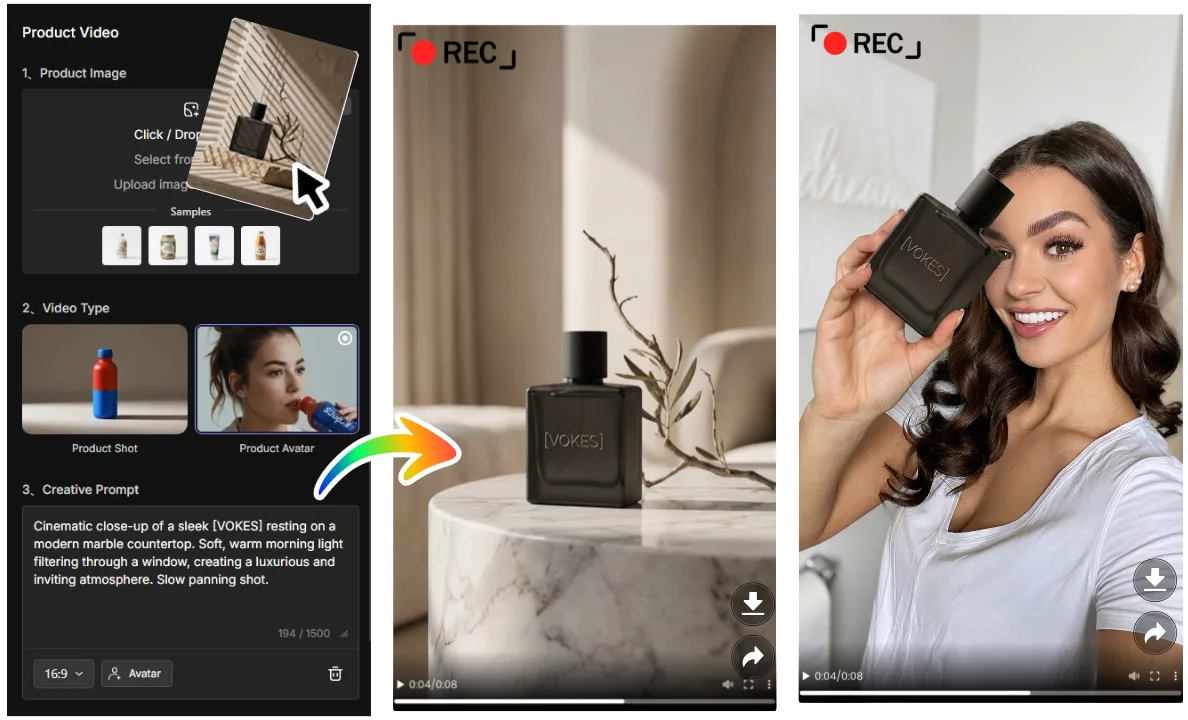
Prompt example: "Cinematic close-up of a sleek [your product name] resting on a modern marble countertop. Soft, warm morning light filtering through a window, creating a luxurious and inviting atmosphere. Slow panning shot."
Step 2: Generate and Customize
Once you upload your materials to the Vokes workbench, its core AI product video function is fully revealed. At this point, the platform offers two highly commercially valuable generation paths:
● Generate pure product dynamic ads (videos or images): The AI will use your parameter selections and prompts to create top-tier visual effects for your static product images, including stunning 360-degree rotations, flowing light and shadow, and advanced dynamic background transitions;
● Choose a custom product avatar: You can select an AI avatar from Vokes' material library that matches your brand's style, or even upload your own photo to customize a personalized narrator. The AI will automatically generate a realistic interactive video of the avatar holding your product, making natural body movements, and providing precise lip-syncing narration.Human psychology dictates that we connect with faces; this feature bridges the gap between a cold digital storefront and a personalized shopping experience.
Once everything is set up, simply click the generate button. The entire process is incredibly smooth; you only need the time it takes to grab a coffee to witness firsthand how Vokes instantly creates AI videos from text and image.
Step 3: Download or Share to Any Platform
After generating the video, don't rush to export it. In Vokes' interface, you can further fine-tune the background music or check if the digital avatar's lip-sync and tone are natural and smooth.
At this stage, ensure the first 3 seconds of the video have sufficient visual impact and add a clear CTA (Call to Action, such as "Click the link below to buy now") at the end. This is what makes a complete, ready-to-run viral ad. Once everything is confirmed, download and distribute it to your TikTok, Facebook, or e-commerce website with one click.
Pro Tips: How To Create Viral Product Videos
Mastering the basics is just the beginning. To make your videos go viral, you need to master these advanced techniques. This is the core secret to truly creating viral product videos:
● The 3-Second Rule: No matter how beautiful the AI-generated visuals are, if there's no suspense in the first three seconds, users will swipe away immediately. Start your video with a powerful pain point question or a visually striking close-up of the product to lock in their attention.
● Match the Vibe: Don't overuse effects; the scene must serve the product. For tech products, choose a cyberpunk or minimalist cool-light background; for beauty and skincare, soft natural light and a warm home setting will improve conversion rates.
● Leverage the “Human” Element: Ad data doesn't lie. Videos with digital human narration typically have a much higher completion rate than pure product rotation displays. Because the eye contact between the "person" on the screen and the audience can instantly build consumers' trust in the brand.
Proven Use Cases: Where Can You Apply This?
Once you master this methodology, you'll discover its incredibly broad application scenarios:
● E-commerce Demos: Shopify or Amazon independent website sellers can use these tools to quickly create free product demos. Embedding vivid videos into product detail pages will significantly increase the "add to cart" rate.
● Fashion Lookbooks: Clothing brands no longer need to spend heavily on overseas models and location shooting. Using AI Fashion Models, you can generate videos of models with different skin tones and in different settings within minutes. The drape of the fabric is so realistic that even competitors can't tell the difference.
● Performance Marketing: This is the most beloved feature for advertising professionals. You can batch-swap the digital avatar’s script, the hook, and the background environment, producing 50 versions of materials a day to run A/B tests on Facebook or TikTok, quickly identifying the "conversion king" with extremely low trial-and-error costs.
Final Thoughts:
The future of video marketing is here, and it's more accessible than we imagine. Many worry that AI will replace creators, but the truth is: AI won't replace you, but those marketing peers who skillfully use AI will leave you far behind.
If you've been wanting to optimize your video stream but don't know where to start, or if your team is facing a significant cut to their marketing budget, don't hesitate. Try a free online AI product video generator now. Start your first test with Vokes and see how a few minutes of change can unexpectedly boost your brand's sales.
FAQs:
I have absolutely no video editing experience; can I still use these tools?
Absolutely! Modern top AI platforms are designed for users with no experience. As long as you can type and upload images, you don't need to learn complex software like Premiere or After Effects to generate professional-quality videos in minutes.
Will the algorithms of social media platforms like TikTok or Instagram suppress AI-generated ad videos?
Absolutely not. Social media platforms' algorithms primarily focus on user interaction data (such as completion rate, likes, and clicks). As long as your video establishes eye contact through high-quality digital humans and retains viewers with compelling captions, AI-generated videos can easily garner significant traffic.
Can I use the AI-generated product videos I create for commercial advertising?
Yes. Most mainstream AI video generation platforms offer full commercial usage rights. You can confidently use these generated videos on Facebook Ads, TikTok, website embeds, and any commercial social media posts.
